MCP Server
CoderFlow can act as a Model Context Protocol (MCP) server. Once an administrator enables it, any MCP-capable agent — Claude Code, Claude Desktop / Cowork, GitHub Copilot in VS Code, Cursor, and others — can hand work to CoderFlow directly instead of a user copying and pasting between tools.
Through the MCP server an external agent can:
- Discover the environments and task templates the user can use
- Create a task, optionally passing along a handoff (summary and transcript) of the session it is coming from
- Run the same task with several agents side by side as one task group, the way the Web UI's multi-agent launcher does
- Attach files for the CoderFlow agent to read
- Poll a task's status and read the agent's latest response (or, on request, its summary with an indication of how far behind the conversation it is)
- Browse work by task group: see multi-agent submissions and their judge runs as one rolled-up unit, then drill into the individual tasks
- Launch a judge or review run on a finished group, with the judge run by any agent (often a different provider than the one that wrote the code), the same way the Web UI's AI Review / Judge does
- Read a finished task's output: judge and review recommendations (verdict, confidence, per-variant improvements), the visible agent responses across turns, failure diagnostics, and any file under
/task-output - Send follow-up instructions to a finished task
- Rename tasks and task groups so they are identifiable on the dashboard
- Pin and unpin tasks and task groups, including unpinning several finished groups in one call
- Discover an environment's deployment profiles, read a profile's parameter schema, start a deployment, and follow it like any other task
Every connection authenticates with a user's personal API key and runs under that user's roles and permissions. The MCP server never grants access beyond what the same user has in the Web UI or CLI.
Enable the MCP Server
- Go to Settings → Integrations → MCP Server
- Toggle Enabled on and click Save
- Copy the Endpoint URL (for example
https://coderflow.example.com/mcp)
The endpoint uses the Site URL from General settings when one is configured; otherwise it reflects the address you are browsing from. Make sure the URL you hand to clients is reachable from the machines where those clients run. MCP and OAuth URLs are always built from the origin (https://host[:port]): the routes and the OAuth discovery documents live at the root, so a Site URL path prefix is not carried into them, and the public base URL setting must be an origin with no path.
The setting can also be pinned with the MCP_SERVER_ENABLED environment variable (true or false) on the server. When the variable is set, the Settings toggle is read-only.
The MCP server is off by default. Requests to /mcp return 404 while it is disabled.
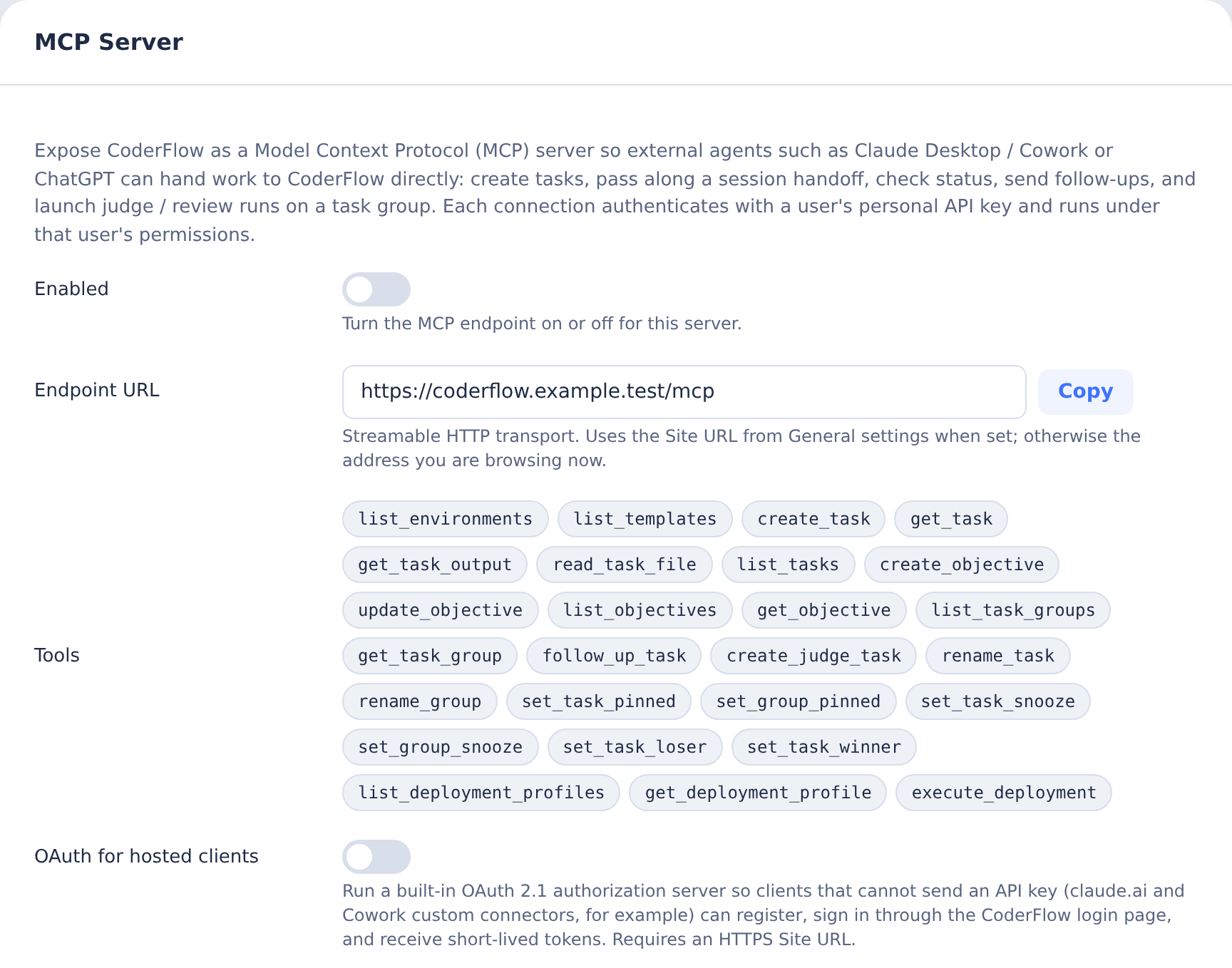
Enable OAuth for Hosted Clients
Some clients cannot attach a static API key to a remote MCP server. claude.ai and Cowork custom connectors, for example, expect the server to implement the MCP authorization flow (OAuth 2.1 with PKCE and dynamic client registration). CoderFlow ships that authorization server built in.
- Set an HTTPS Site URL in Settings → General. The OAuth issuer is derived from it, and the MCP SDK refuses non-HTTPS issuers other than localhost.
- In Settings → Integrations → MCP Server, toggle OAuth for hosted clients on and click Save.
- Copy the Endpoint URL (for example
https://coderflow.example.com/mcp) and add it as a custom connector in the client.
When a client first calls the endpoint without credentials, CoderFlow answers 401 with a WWW-Authenticate challenge that points at the discovery document. The client registers itself, opens the CoderFlow login page in the browser (local login or SSO), shows a consent page naming the client, and receives tokens once the user approves. No key is copied anywhere.
Endpoints, all under the Site URL:
| Endpoint | Purpose |
|---|---|
/.well-known/oauth-authorization-server | Authorization server metadata |
/.well-known/oauth-protected-resource/mcp | Protected resource metadata for /mcp |
/mcp/oauth/register | Dynamic client registration |
/mcp/oauth/authorize | Login and consent, issues authorization codes |
/mcp/oauth/token | Exchanges codes and refresh tokens |
/mcp/oauth/revoke | Token revocation |
Token lifetimes:
| Token | Lifetime |
|---|---|
| Authorization code | 10 minutes, single use |
| Access token | 1 hour |
| Refresh token | 30 days, rotated on every use |
Tokens are stored only as hashes in mcp-oauth.json in the server data directory. The setting can be pinned with the MCP_OAUTH_ENABLED environment variable, and it has no effect while the MCP server itself is disabled.
Hardening the authorization server
Dynamic client registration is open by design: anyone who can reach the registration endpoint can register a client with any name. Two settings on the MCP Server panel close the resulting phishing path. Both are off by default so existing connections keep working; turn them on for production servers.
- Allowed OAuth redirect hosts. One hostname per line, with
*.example.commatching subdomains. Registrations and authorizations that redirect anywhere else are refused, including clients registered before the list was set. Loopback addresses used by local clients such as Claude Code andmcp-remoteare always allowed. For Claude connectors, allowclaude.aiand*.anthropic.com, and check the redirect host shown on the consent page the first time you connect. - Require fresh sign-in for consent. A number of minutes. Approving a new client then requires a login newer than that; an older browser session is sent back through the login page first. Local users re-enter their password (and MFA code when enrolled); SSO users are re-prompted by the identity provider because CoderFlow requests
prompt=login. This stops a walk-up on an unlocked, signed-in browser from silently authorizing a connector. On development servers started withDISABLE_AUTH, there is no login to refresh, so the rule is treated as satisfied.
Managing authorized clients
Users can list and revoke the clients they have approved:
# List my authorized MCP clients
curl -H "Authorization: Bearer $CODER_API_KEY" "$CODERFLOW_URL/api/mcp-oauth/grants"

# Revoke one client, or everything
curl -X DELETE -H "Authorization: Bearer $CODER_API_KEY" "$CODERFLOW_URL/api/mcp-oauth/grants/<client_id>"
curl -X DELETE -H "Authorization: Bearer $CODER_API_KEY" "$CODERFLOW_URL/api/mcp-oauth/grants"
Revoking a refresh token also revokes the access tokens issued with it. Deleting a user revokes everything they authorized, because tokens only work while the user still exists.
Dedicated MCP Listener
By default the MCP endpoint and its OAuth routes are served by the main CoderFlow port. Deployments can instead start a second HTTP listener that serves only the machine-facing MCP routes and expose just that port, keeping the main application port private. This is the same pattern as the messaging-integrations and webhook listeners, and like them it is route and port isolation inside one Node process, not a separate process or privilege boundary.
Set the following before starting the server:
MCP_INGRESS_MODE=listener
MCP_INGRESS_PORT=3004
MCP_INGRESS_HOST=0.0.0.0
MCP_INGRESS_PORT by itself also enables listener mode. The listener uses the same TLS configuration as the main server.
The listener serves:
GET /healthPOST /mcp(plus theGET/DELETEmethod-not-allowed responses)POST /mcp/oauth/token,POST /mcp/oauth/register,POST /mcp/oauth/revokeGET /.well-known/oauth-authorization-serverGET /.well-known/oauth-protected-resource/mcp
It does not serve the web UI, the authenticated APIs, or /mcp/oauth/authorize. Login and consent always happen on the main application, in the user's browser. Only bearer credentials (OAuth access tokens or personal API keys) authenticate on the listener; browser sessions do not.
When using the listener:
- Set Site URL in General settings to the main application URL users open in a browser. The OAuth metadata publishes the authorization endpoint there.
- Set Public base URL for MCP clients on the MCP Server panel to the public HTTPS address of the listener, for example
https://mcp.example.com. The endpoint URL, discovery documents, and token endpoints are published there. TheMCP_PUBLIC_BASE_URLenvironment variable pins the same value. - Check the read-only Dedicated MCP listener field to confirm the server sees the expected mode and port.
Internal servers and hosted connectors
This split is what makes hosted connectors work against a CoderFlow that is not on the public internet. Claude connectors make their MCP, registration, and token requests from Anthropic's servers, but the login and consent steps run in the user's browser. With the listener:
- Expose only the listener port through the firewall, ideally restricted to Anthropic's published egress IP ranges, with a publicly trusted certificate.
- Keep the main application internal. Users on the internal network reach the login and consent pages there.
- Set the redirect allowlist to the Claude callback hosts so nothing else can register.
Connect a Client
Clients that support the MCP authorization flow (claude.ai and Cowork custom connectors, and recent versions of Claude Code, Claude Desktop, VS Code, and Cursor) can use OAuth as described above: add the endpoint URL and sign in when prompted.
Any client can instead use a personal API key sent as a Bearer token on every request. There is no Web UI page for creating one; use any of these routes:
- Run
coder login(username and password) orcoder login --sso(OIDC device flow). The server issues a key and the CLI stores it in the active profile in~/.coder/config.json. - Sign in through the VS Code extension's Profile Manager; it stores the returned key in the selected profile.
- Call
POST /api-keyswith{ "name": "MCP" }from an authenticated session; the secret is returned once.
See API Keys for rotation and revocation. Replace <API_KEY> in the examples below.
Claude Code
claude mcp add --transport http coderflow https://coderflow.example.com/mcp \
  --header "Authorization: Bearer <API_KEY>"
Then, from any Claude Code session:
Hand this work off to CoderFlow in the
billingenvironment. Summarize what we did and what is left.
Claude Code calls create_task with a handoff object, and the resulting task appears in the CoderFlow dashboard.
Claude Desktop and Cowork
With OAuth enabled, add CoderFlow as a custom connector using the endpoint URL. Cowork opens the CoderFlow login page, the user approves the consent screen, and the connector is ready. Organization administrators can add the connector once for everyone.
Without OAuth, Claude Desktop can still launch local MCP servers from claude_desktop_config.json. Use the mcp-remote bridge to reach CoderFlow's HTTP endpoint with a Bearer token:
{
  "mcpServers": {
    "coderflow": {
      "command": "npx",
      "args": [
        "-y",
        "mcp-remote",
        "https://coderflow.example.com/mcp",
        "--header",
        "Authorization: Bearer <API_KEY>"
      ]
    }
  }
}
Restart Claude Desktop after editing the file. The CoderFlow tools then appear in Cowork sessions.
VS Code and GitHub Copilot
Add CoderFlow to .vscode/mcp.json (workspace) or your user MCP settings:
{
  "servers": {
    "coderflow": {
      "type": "http",
      "url": "https://coderflow.example.com/mcp",
      "headers": {
        "Authorization": "Bearer <API_KEY>"
      }
    }
  }
}
To keep the key out of the file, VS Code supports input variables:
{
  "inputs": [
    { "id": "coderflow-key", "type": "promptString", "password": true, "description": "CoderFlow API key" }
  ],
  "servers": {
    "coderflow": {
      "type": "http",
      "url": "https://coderflow.example.com/mcp",
      "headers": { "Authorization": "Bearer ${input:coderflow-key}" }
    }
  }
}
Other clients
Any client that supports the MCP Streamable HTTP transport with custom headers can connect. The server is stateless: it does not issue session IDs and does not open a standalone server-to-client event stream, so it works behind ordinary reverse proxies and load balancers without sticky sessions.
Tasks as clients (agent orchestration)
CoderFlow tasks can themselves be MCP clients of the server, so an agent running in a task, including one launched by an automation, can create, follow up, judge and inspect other tasks. No API key is involved: the server injects a coderflow entry into the task's MCP configuration at launch with a task-bound token.
To turn it on for an environment:
- Enable the MCP server as described above.
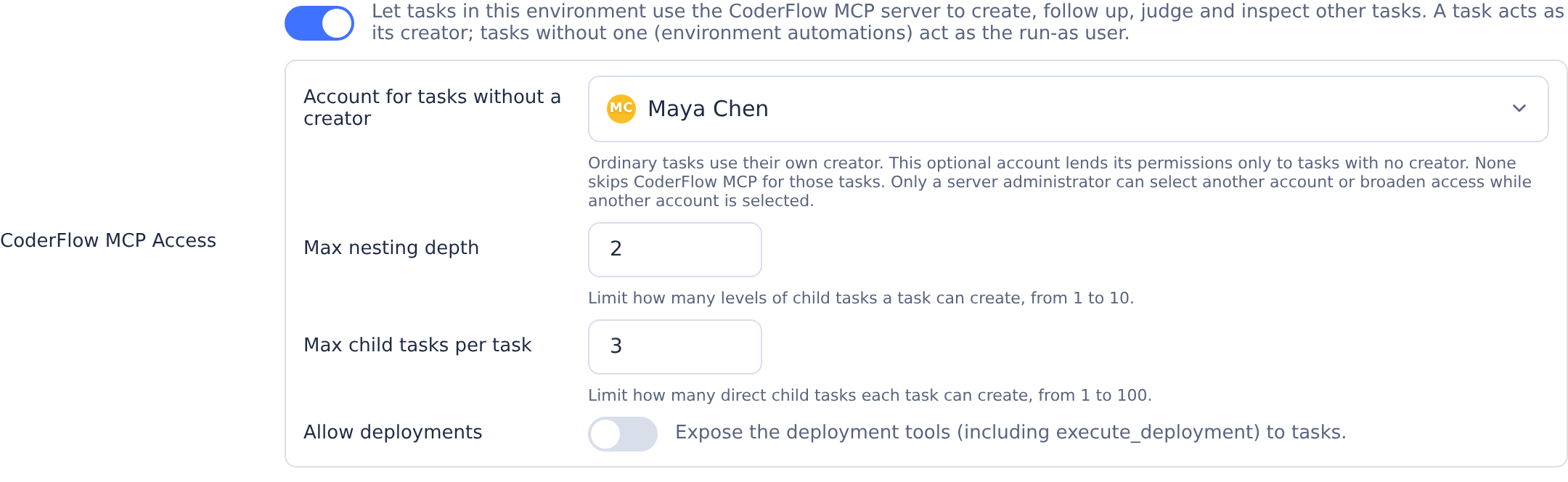
- Open Environments → Overview, find CoderFlow MCP Access below the MCP Servers row (it requires the
environments:mcp-serverspermission), switch it on, and click Save MCP Access. - Optionally set a run-as user, the nesting and child limits, and whether the deployment tools are exposed.
Every task launched in that environment afterwards, whether from the Web UI, an integration, or an automation, gets the coderflow server in its MCP configuration (Claude, Codex, Gemini, Bob, Kimi, and Grok using its default ACP transport). The entry appears as a read-only chip in the MCP Servers row; the name coderflow is reserved for it.
Grok receives the managed configuration through the shared ACP client. The legacy GROK_TRANSPORT=streaming-json fallback bypasses that client and does not load the mounted MCP snapshot. End-to-end verification of HTTP MCP headers with the Grok CLI is still pending; its ACP interface advertises HTTP support, but the local verification attempt was blocked by authentication.
Who the task acts as. The token names the task, not a user. On every call the server resolves the acting user:
- A task with a creator (Web UI, integration, personal automation, or a task created over MCP) acts as that creator.
- A task with no creator, which is what an environment-scope automation launches, acts as the environment's run-as user. With no run-as user configured, such tasks get no
coderflowentry and the launch log records why.
The acting user's role bindings apply exactly as they would for a personal API key, so a run-as user should be a dedicated service account with only the tasks:* permissions it needs. Because the run-as user lends its permissions to every creator-less task, delegating to an account other than yourself requires a full server administrator, and so does turning the feature on, allowing deployments, or raising the limits while such an account is the run-as user. An environment admin can always narrow the setting, clear the run-as user, or name themselves. Beyond those bindings the token is narrowed in two ways: the deployment tools (list_deployment_profiles, get_deployment_profile, execute_deployment) are not registered unless Allow deployments is on, and follow_up_task refuses the calling task's own ID.
Lineage and limits. Tasks created from a task record parentTaskId, rootTaskId and taskDepth (visible in get_task, the task list, and on the dashboard, where list layouts nest the child beneath its parent and flat layouts show a Child task pill). Judges started with create_judge_task and deployments started with execute_deployment are children too, and judges the server launches on those children's behalf (auto-judge, review-loop rounds, verification passes) join the same generation instead of starting new roots. The environment's Max nesting depth (default 3) and Max child tasks per task (default 10) bound the fan-out; the tools answer task_depth_exceeded or child_task_limit_exceeded when a call would cross them. The child limit is enforced atomically where tasks are created, so concurrent calls cannot overshoot it, and it counts every child regardless of who launched it. A multi-agent create_task counts one child per agent. On the dashboard, a user can move a nested child out of its parent with the up-arrow on its row; that only changes where the task is shown (it drops the pill and leaves the parent's pin and snooze cascades), while the lineage fields and these limits stay as recorded.
Waiting on children. Child tasks run asynchronously. The parent polls get_task until the child's status is terminal and then reads its output with get_task_output. There is no wake-on-completion yet, so keep the orchestration turn short or have the parent finish and let a human or automation follow up.
Token lifetime. The task token is valid for 30 days and is re-minted whenever a stopped task container is started again, so long-lived tasks keep working after a restart. Deleting the task, turning the setting off, or removing the acting user revokes access immediately, since the server re-checks all three on every call. The token can only fetch MCP tools; it is not accepted by the git credential helper, and git container tokens are not accepted by /mcp.
Tools
| Tool | What it does |
|---|---|
list_environments | Environments the user can see, with repositories, default agent, and whether the user may create tasks there. |
list_templates | Task templates in an environment, including parameter definitions. |
create_task | Create and start a task. Accepts instructions, an optional template and parameters, agent or an agents list (several agents as one task group), groupId, optional model, reasoningEffort and speed for one explicit agent, branches, staged, file attachments, and a handoff object. |
get_task | Current status of a task and the agent's latest visible response (tail-bounded, full text on request). The agent-written summary is opt-in and comes with provenance that shows how many follow-ups it predates. Also the task's groupId, a failure object for failed tasks, and the variant labels of judge/review tasks. |
get_task_output | Everything needed to act on a finished task: the best available summary, the parsed judge/review recommendation, the visible agent responses across turns, failure diagnostics, and a listing of the files under /task-output. Per-variant artifacts are available on request. |
read_task_file | Read any file under a task's /task-output directory, paged by byte offset, so large artifacts (patches, logs, debug streams) never have to be returned whole. |
list_tasks | Individual tasks visible to the user as a flat list, newest first, with optional environment, status, ownership, pinned, groupId, and snooze-inclusion filters. Currently snoozed tasks are excluded by default. |
list_task_groups | Task groups visible to the user, newest first, one rolled-up entry per group, plus stand-alone tasks that belong to no group. Optional environment, status, ownership, pinned, and snooze-inclusion filters. Currently snoozed items are excluded by default. |
get_task_group | One task group with its rollup and the variant and judge tasks that make it up. |
follow_up_task | Continue a finished (or staged) task with more instructions and optional attachments. |
create_judge_task | Launch a judge/review on a completed taskId or existing groupId. Choose agent or agents, optional taskIds, instructions, and reviewLoop. One reviewer accepts model, reasoningEffort, and Codex-only speed (default Standard); use reviewerSettings for independent per-agent selections. Supply requestId for safe identical retries. See Judge and review runs. |
rename_task | Change a task's display name. For a grouped task this renames the whole group by default (pass scope: "task" for just the one task). Judge/review tasks keep their judge: / review: prefix. |
rename_group | Rename every task in a multi-agent group (all variants plus their judge/review tasks). |
set_task_pinned | Pin or unpin one task, with the same cascade rules as the dashboard pin button. |
set_group_pinned | Pin or unpin one or more task groups in a single call; every member of each group changes together. |
set_task_snooze | Snooze a pinned task until an absolute time or for a relative number of minutes, or unsnooze it. Uses the Web UI cascade rules. |
set_group_snooze | Snooze or unsnooze a pinned task group and its variants and judge/review tasks together. |
set_task_loser | Mark a variant as a loser, or clear the mark. A loser is excluded from further evaluation, so this is how a variant is taken out of the running. See Recording the outcome. |
set_task_winner | Mark a variant as the winner, or clear the mark. A designation only: it records the pick and clears the star from the group's other variants, and excludes nothing. |
list_deployment_profiles | Deployment profiles defined in an environment, with description, whether a script exists, and parameter names. |
get_deployment_profile | One profile's parameter schema (names, labels, types, required flags, defaults, allowed values) plus the environment's branch selection policy. |
execute_deployment | Runs a deployment. Starts a deploy task that runs the profile's deployment script with the supplied parameter values, exactly like the Deploy menu in the Web UI. Side-effecting; returns the task ID. |
rename_group, set_group_pinned, and set_group_snooze take the groupId described under Task groups below.
Task groups
When a task is submitted to several agents at once, CoderFlow creates one task group holding one variant task per agent. Judge and review tasks launched for that submission, whether by hand or by auto-judge, join the same group. list_tasks returns all of these as individual tasks, so an external agent cannot tell which belong together. The group tools give the rolled-up view:
list_task_groupsreturns one entry per group with the group ID, name, environment, the agents that ran variants (agents) and judges (judgeAgents), counts by task status (statusCounts), an overallstatus,createdAt,lastActivity, and the group's outcome state:winnerTaskId(the variant marked with the star, if any),loserTaskIds, andevaluableTaskIds(what a judge/review run would evaluate right now). Tasks that were never part of a group are returned alongside inungroupedTasksso the listing accounts for everything; passincludeUngroupedTasks: falseto leave them out.get_task_grouptakes agroupIdand returns the same rollup together with the member tasks: variants in submission order, then judge tasks (isJudgeTask: true,judgeModeofcomparisonorreview). Each member carries its status, agent, task type, and ID forget_taskorfollow_up_task.- Every task returned by
get_task,list_tasks, orget_task_groupincludes itsgroupId(nullfor a stand-alone task). Judge tasks also includeoriginalGroupId, the group whose variants they judged.list_tasksaccepts agroupIdfilter as a second way to drill in.
Both listing tools exclude currently snoozed items by default so a pinned item stays out of sight until it wakes. Pass includeSnoozed: true to opt in. Tasks and groups report the computed boolean isSnoozed and the stored wake timestamp pinSnoozedUntil; non-snoozed items report isSnoozed: false. A group is considered snoozed while any pinned member is currently snoozed, matching the grouped dashboard tile. Its pinSnoozedUntil is the latest active member wake time, so mixed legacy state does not resurface part of a group early. snoozedTaskCount exposes that partial group state. The total and ungroupedTotal values are calculated after this filter and before limit is applied.
The rolled-up status follows the same rules as the group status in the Web UI:
| Status | Meaning |
|---|---|
running | At least one task in the group is running (or has a live terminal session). |
completed | Every task completed. |
failed | Every task failed. |
partial | Mixed outcomes, or some tasks are still queued. Check statusCounts. |
staged | Every task is staged and waiting to be started. |
pending | The group has no tasks yet. |
Group IDs start with g-. Group links open the group view in the Web UI (task.html?groupId=…). To create a group from MCP, pass an agents list to create_task; see Multi-agent tasks.
Judge and review runs
create_judge_task launches the same judge the Web UI's AI Review / Judge action launches, against a completed task or an existing group. Pass taskId to review one task (a stand-alone task is promoted into a group), or groupId to review qualifying variants in a group. Do not combine taskId and groupId, or taskId and taskIds:
{
  "groupId": "g-1717000000000-ab12cd34e",
  "agents": ["claude", "codex"]
}
The judge is itself a task. CoderFlow collects every evaluated variant's summary, agent responses, follow-up history, and diffs, anonymises the variants as [[VARIANT:A]], [[VARIANT:B]], and so on, writes them under /task-output/ (original-instructions.md, variant-summaries/, variant-responses/, variant-history/, variant-diffs/), and runs the standard judge prompt. The judge writes recommendation.md and recommendation.json, which the Web UI shows in the AI Analysis dialog. Nothing about that pipeline differs between MCP and the Web UI; the tool only chooses the inputs.
There is one mechanism with two presentations, decided by how many variants are evaluated:
| Variants evaluated | mode | What the judge does |
|---|---|---|
| One | review | Assesses the quality of that variant and returns a pass / needs-improvement / fail verdict with improvements. |
| Several | comparison | Compares the variants, ranks them, and recommends a winner. |
Which variants qualify: the group's completed variant tasks that are not marked as losers (judge tasks are never evaluated). By default all of them are evaluated; pass taskIds to narrow the set, for example to review a single variant of a multi-agent group. Task IDs outside the qualifying set are rejected with invalid_task_ids. If nothing in the group has completed yet, the call fails with nothing_to_evaluate and reports each variant's status so you know what to wait for.
Who judges: agent names one agent; agents launches one independent judge task per agent (the same rules as the agents list of create_task: known agents only, no duplicates, credentials checked up front). The judge does not have to be the agent that wrote the code. A common pattern is to have code written by Claude judged by Codex, or to run both a Claude judge and a Codex judge on the same group and compare their recommendations.
Reviewer model, reasoning effort, and speed. Like the task selection fields, a single reviewer accepts model, reasoningEffort, and speed:
{
  "taskId": "1717000000001-x1",
  "agent": "codex",
  "model": "gpt-6-astra",
  "reasoningEffort": "high",
  "speed": "ultrafast",
  "requestId": "58e28bee-2871-4f42-bbfa-4deba8332708"
}
For multiple reviewers, use reviewerSettings, keyed by selected agent. Each reviewer keeps independent settings:
{
  "groupId": "g-1717000000000-ab12cd34e",
  "agents": ["claude", "codex"],
  "reviewerSettings": {
    "claude": { "reasoningEffort": "high" },
    "codex": { "model": "gpt-6-astra", "reasoningEffort": "high", "speed": "fast" }
  },
  "requestId": "bd9560b3-e4ef-49f2-86b1-bcd6fd251a40"
}
- Top-level
model,reasoningEffort, andspeedrequire exactly one reviewer. Do not combine them withreviewerSettings. The map may contain only agents selected in the request. - Omitted model and effort use the reviewer's environment/server defaults. Omitted speed means Standard, independently of the implementation task's speed.
speedacceptsstandard,fast, orultrafastand is Codex-only, even for explicitstandard. - Explicit MCP model IDs come from the CoderFlow catalog. Model/effort combinations and speed policy are validated before group promotion or judge creation. Fast and Ultrafast need existing server/environment permission and a supported model/endpoint; Ultrafast additionally requires server opt-in and a supported explicit or effective model (currently
gpt-6-astra). Auto model selection is not supported for Ultrafast. Invalid requests fail without a silent downgrade. - Selections carry into subsequent review-loop/verification rounds, with current policy checked again at launch. Forwarding feedback does not change the implementation task's speed.
- Generate a UUID
requestIdfor each intentional run. Reuse it with identical arguments after a lost response or on concurrent retries to retrieve the same result. Changing model, effort, speed, or anyreviewerSettingsentry with that ID producesidempotency_conflict; use a new ID for a new run. Without a request ID, another call creates another run.
See Choosing reviewer speed for the corresponding UI controls, saved automatic-review settings, and resubmission behavior.
Every judge task joins the group it evaluates (groupId and originalGroupId both point at it), exactly like a judge launched from the Web UI, so get_task_group lists it after the variants, the group rollup counts it, and pinning, snoozing, and winner selection keep working. The response returns the judge task IDs together with the group:
{
  "groupId": "g-1717000000000-ab12cd34e",
  "groupUrl": "https://coderflow.example.com/task.html?groupId=g-1717000000000-ab12cd34e",
  "environment": "billing",
  "mode": "comparison",
  "variantTaskIds": ["1717000000001-x1", "1717000000002-x2"],
  "agents": ["claude", "codex"],
  "taskIds": ["1717000000010-j1", "1717000000011-j2"],
  "tasks": [
    { "taskId": "1717000000010-j1", "agent": "claude", "status": "running", "url": "…" },
    { "taskId": "1717000000011-j2", "agent": "codex", "status": "running", "url": "…" }
  ],
  "reviewLoopAvailable": false,
  "reviewLoop": null
}
A single-agent call also returns the top-level taskId, status, and url fields, like create_task. Poll the judge tasks with get_task; a judge's summary is its recommendation. If a later judge fails to start after earlier ones were created, the call returns partial_failure with the judges that do exist.
Optional instructions are appended to the standard judge prompt as extra focus for the judge (what to weigh, what to check), the same as the custom instructions field in the Web UI, up to 4,000 characters.
Auto-review loop. When the run is a review (one variant), the Web UI also offers an auto-review loop: each round's review feedback is sent back to the variant as a follow-up, and the same judges are re-run until the review passes, the variant stops changing code, or the round limit is reached. The tool reports whether that applies as reviewLoopAvailable, but a single run is always the default. To opt in, pass reviewLoop with an optional maxRounds (1 to 10, default 3) and minFeedbackPriority (high, medium, or low; default medium, the lowest improvement priority forwarded each round):
{
  "groupId": "g-1717000000000-ab12cd34e",
  "agent": "codex",
  "taskIds": ["1717000000001-x1"],
  "reviewLoop": { "maxRounds": 3, "minFeedbackPriority": "medium" }
}
The loop is registered once the judges have been created, so round one is exactly those judges, and the response's reviewLoop shows its state. Passing reviewLoop for a comparison run is rejected with review_loop_not_applicable. The loop submits follow-ups on your behalf and therefore also needs tasks:change on the variant's environment. Stopping a running loop, cancelling a judge, and applying a recommended winner remain Web UI operations.
Session handoff
create_task accepts a handoff object:
{
  "environment": "billing",
  "instructions": "Finish the invoice totals refactor and make the tests pass.",
  "handoff": {
    "source": "Claude Code session",
    "summary": "Refactored invoice.js to use Decimal. totals.test.js still fails on rounding. Do not touch the API layer.",
    "transcript": "…full conversation…"
  }
}
CoderFlow inlines the summary into the task instructions (bounded to roughly 24,000 characters) and writes the full summary and transcript to /task-output/attachments/handoff.md inside the task container, so the CoderFlow agent starts with the prior context instead of a cold prompt.
Model, reasoning effort, and speed
create_task accepts optional model, reasoningEffort, and speed selections. These use the same task overrides, effective model/effort validation, and launch configuration as the Web UI; they do not change saved defaults or policies.
{
  "environment": "my-project",
  "instructions": "Implement the requested change and run focused tests.",
  "agent": "codex",
  "model": "gpt-6-astra",
  "reasoningEffort": "high",
  "speed": "ultrafast",
  "requestId": "d6f5e60d-428a-4de4-a188-7bf3ebec231c"
}
- When any selection is supplied, name exactly one agent using
agentor a one-entryagentslist. Multi-agent calls must omit these selections. Use separate single-agent submissions for different selections. A single-agent call may also add a customized task to an existing group withgroupId. modelmust be an ID in that agent's CoderFlow model catalog. A model from another provider or an unknown ID is rejected.reasoningEffortmust be supported by the provider and effective model. Providers without effort controls reject it. Omitting model or effort retains the existing environment/server defaults for that field.speedis Codex-only:standard,fast, orultrafast. Omission retains Standard. Accelerated modes require a supported model and endpoint, server permission, and environment permission. Ultrafast also requires the server's Ultrafast opt-in and a supported explicitly resolved model;autois not supported for Ultrafast. Custom Codex endpoints do not support accelerated modes.- Invalid or disallowed selections return an error; CoderFlow does not silently downgrade speed or effort. Availability is checked again at launch against the selected account and container CLI. Normal submissions return accepted task IDs before Docker startup, so a later availability failure is recorded on the task; poll
get_taskfor it.
Generate a fresh UUID requestId for each intentional submission and reuse it with identical arguments after a lost response. Model, effort, and speed are all included in the submission fingerprint. Changing or omitting any of them with the same ID returns idempotency_conflict. An identical successful retry returns the original task rather than launching again, even if defaults or speed policies have since changed; current policies still apply when the task launches.
Multi-agent tasks
Pass agents instead of agent to run the same task with several agents at once:
{
  "environment": "billing",
  "instructions": "Finish the invoice totals refactor and make the tests pass.",
  "agents": ["claude", "codex", "gemini"]
}
This is the same thing as selecting several agents in the Web UI launcher. CoderFlow creates one task group and one task per agent inside it, and every task gets the identical instructions, environment, branches, template and parameters, attachments, and handoff context. Judge and review tasks started later for any of these tasks attach to the same group, and the group shows as one tile on the dashboard.
The response lists the group and each task:
{
  "environment": "billing",
  "name": "Finish the invoice totals refactor and make the tests pass.",
  "groupId": "g-1717000000000-ab12cd34e",
  "groupUrl": "https://coderflow.example.com/task.html?groupId=g-1717000000000-ab12cd34e",
  "agents": ["claude", "codex", "gemini"],
  "taskIds": ["1717000000001-x1", "1717000000002-x2", "1717000000003-x3"],
  "tasks": [
    { "taskId": "1717000000001-x1", "agent": "claude", "groupIndex": 0, "status": "running", "url": "…" },
    { "taskId": "1717000000002-x2", "agent": "codex", "groupIndex": 1, "status": "running", "url": "…" },
    { "taskId": "1717000000003-x3", "agent": "gemini", "groupIndex": 2, "status": "running", "url": "…" }
  ]
}
Poll each task with get_task, or the whole group with get_task_group. A single-agent call (agent, or agents with one entry) creates no group and keeps returning the top-level taskId, status, and url fields as before.
Rules for the agents list:
- Each entry must be one of
claude,codex,gemini,bob,grok,kimi; unknown names are rejected. - An agent may appear only once. Requests with duplicates are rejected with
invalid_agents. - At most six agents (one per supported agent) per submission.
agentandagentsare mutually exclusive.- Every agent's credentials are checked before anything is created. If one agent cannot authenticate, the call fails with
agent_auth_invalidand no task or group is created.
If a later task in the list fails to start after earlier ones were created, the call returns partial_failure with the group id and the tasks that do exist, so you can poll or clean them up rather than resubmitting everything.
To add another agent to a group that already exists, pass the group's id as groupId together with agent (or agents). The new task joins the group at the next position. environment may be omitted, in which case the group's environment is used; naming a different environment is rejected with group_environment_mismatch. The group must be one you created or one containing a task you can see; otherwise the call returns group_not_found.
Renaming tasks and groups
A task name is stored per task; groups do not carry a name of their own, but from the user's point of view a group has one name: the dashboard's group tile shows the name of whichever variant is displayed. Renaming a single variant would leave the tile showing a stale name, so both rename tools treat a group as the unit, the same way the Web UI's rename does:
rename_taskrenames the task you name. If that task belongs to a group, it renames every task in the group by default: all variants plus the judge/review tasks spawned for it. Passscope: "task"to rename only that one task; the response then notes that the rest of the group was left alone. Stand-alone tasks are simply renamed.rename_groupdoes the same for a group ID.
{ "taskId": "abc123", "name": "Invoice totals refactor" }
{ "taskId": "abc123", "name": "Just this variant", "scope": "task" }
{ "groupId": "grp-3f9c2a", "name": "Invoice totals refactor" }
Judge and review tasks keep their judge: / review: prefix automatically. Names are limited to 120 characters. Both tools return renamedTaskIds (every task that was renamed) and the updated task(s), so the scope of the change is always visible; rename_task also reports the scope it applied. A group-wide rename requires tasks:change on every member and changes nothing if any member is off limits.
Pinning and unpinning
Pinning is a group-level operation: set_group_pinned pins or unpins all variants of each group together with the judge/review tasks spawned for them, which is what removes a finished group from the dashboard's pinned list. Several groups can be changed in one call, which is the usual way to prune a long pinned list:
{ "groupIds": ["grp-3f9c2a", "grp-91d0be"], "pinned": false }
Every group in the list is validated first (it must exist, and the user must be allowed to change all of its members); a bad ID rejects the whole call before anything changes. Exactly the members that get_task_group reports are changed; unlike the single-task pin button, the group operation never cascades to tasks outside the group (for example the former group of a judge that was later moved). The response lists the affected tasks per group, and any objectives left without pinned children are reported as orphanedObjectives so the caller can decide whether to unpin them too.
set_task_pinned changes a single task and follows the dashboard's cascade rules: unpinning an objective unpins its descendants, and unpinning a grouped task also unpins its group's judge/review tasks. Every task the cascade would reach must be changeable by you (tasks:change, or owner / tasks:change_any for private tasks); if one is not, the call returns permission_denied naming that task and nothing changes. The dashboard shows a group as pinned only when all of its variants are pinned, so prefer set_group_pinned for grouped tasks.
Use list_task_groups with pinned: true to find active candidates; add includeSnoozed: true when snoozed pinned groups should also be considered. Its groupId values (also reported on every task by list_tasks and get_task) are what the group tools take. Cancelling tasks and applying a variant's changes to the repository are not available through MCP; use the Web UI.
Snoozing and waking pins
set_task_snooze and set_group_snooze use the same server-side snooze operation as the Web UI. Pass exactly one wake-time form:
{ "taskId": "abc123", "until": "2026-09-04T14:30:00Z" }
{ "groupId": "grp-3f9c2a", "snoozeForMinutes": 30 }
{ "groupId": "grp-3f9c2a", "until": null }
until is an ISO 8601 timestamp with a timezone. snoozeForMinutes is a positive relative duration measured when the tool runs. until: null wakes the item immediately. Wake times must be in the future and no more than five years away. Snoozing an item that is already snoozed replaces its wake time; a pinned task may be snoozed while it is running. An unpinned item is rejected.
The task tool follows the dashboard cascade: grouped variants and their judge/review tasks move together, and an objective carries its pinned descendants. The group tool addresses the group explicitly. Every affected task requires tasks:change; if any cascaded task is off limits, nothing changes.
After a successful snooze, list_tasks and list_task_groups omit the item by default. Pass includeSnoozed: true to surface it before its wake time, or use the Web UI's dedicated Snoozed view. Both mutation tools return the canonical pinSnoozedUntil, the affected task IDs, and the previous value for each affected task.
Recording the outcome: winner and loser
After evaluating a group, set_task_loser and set_task_winner record where each variant landed, the same two marks the Web UI puts on a task tab (the thumbs-down and the star). They are deliberately not symmetric:
set_task_loseris the mark with a side effect. A loser is excluded from further evaluation:create_judge_taskwill not evaluate it, and the Web UI drops it from the comparison table. In a group of exactly two variants, marking one loser is what makes the other emerge as the winner implicitly - no star is set on it. In a larger group it only narrows the field; the response reports which variants remain.set_task_winneris a designation. It records which variant you picked and clears the star from the group's other variants, so a group has at most one winner. It excludes nothing, cancels nothing, and does not apply the variant's changes.
{ "taskId": "abc123", "loser": true }
{ "taskId": "def456", "winner": true }
Pass false to clear either mark; clearing a loser mark puts that variant back in the running. Both marks are readable before and after acting: every task returned by get_task, list_tasks, and get_task_group carries isWinner and isLoser (and approvedBy), and a group rollup carries winnerTaskId, loserTaskIds, and evaluableTaskIds. Each call returns the same group-level view plus notes explaining what the change did and did not do.
The edge cases follow the Web UI, which settles them by hiding a button:
- Judge and review tasks cannot be marked (
invalid_task). The marks belong to the variants a judge evaluates; mark one of those instead. - A task cannot hold both marks (
conflicting_outcome). There is no silent cross-clearing: clear the star withset_task_winner(winner: false)before marking a loser, or clear the loser mark before marking a winner. A variant that has already been approved cannot be marked a loser either. - A task that is still running can be marked. The mark persists as the task finishes; the response notes that the work is not final.
- Every variant may be marked a loser. The group is then left with nothing to evaluate, and
create_judge_taskfails withnothing_to_evaluateuntil a mark is cleared.
Deployments
Deployments are a separate concept from tasks and task templates. A deployment profile lives in the environment's deployment-profiles/ directory as a {name}.json definition next to a {name}.sh script. The JSON declares the profile's parameters, and each profile can declare different ones:
{
  "description": "Publish CoderFlow packages to NPM registry",
  "parameters": {
    "RELEASE_TYPE": {
      "label": "Release Type",
      "description": "Type of release to perform.",
      "type": "select",
      "options": ["test-only", "dev", "patch", "minor", "major"],
      "default": "test-only",
      "required": true
    }
  },
  "secrets": [{ "name": "npm_publish_token" }]
}
The MCP deployment tools follow the same three steps as the Web UI's Deploy menu (choose the environment, choose the profile, fill in its parameters) and start the deployment through the same server path as that menu (POST /deploy-task). A deployment is therefore an ordinary CoderFlow task of type deploy: it appears in the task list and in list_tasks, its output streams to the task page, and get_task reports its status. There is no separate deployment status mechanism to learn.
1. List the profiles in an environment
{ "environment": "coderflow-dev" }
list_deployment_profiles returns:
{
  "environment": "coderflow-dev",
  "canExecute": true,
  "profiles": [
    {
      "name": "publish",
      "description": "Publish CoderFlow packages to NPM registry",
      "hasScript": true,
      "parameterCount": 1,
      "parameterNames": ["RELEASE_TYPE"],
      "requiredParameterNames": ["RELEASE_TYPE"],
      "secrets": ["npm_publish_token", "github_publish_token"],
      "updatedAt": "2026-08-01T00:00:00.000Z",
      "updatedByName": "Admin User"
    }
  ]
}
canExecute tells the client whether the user could start this deployment from the Web UI.
2. Read the profile's parameter schema
{ "environment": "coderflow-dev", "profile": "publish" }
get_deployment_profile reads the schema from the profile definition at call time and returns it as an ordered list:
{
  "environment": "coderflow-dev",
  "canExecute": true,
  "profile": { "name": "publish", "description": "Publish CoderFlow packages to NPM registry", "hasScript": true, "…": "…" },
  "parameters": [
    {
      "name": "RELEASE_TYPE",
      "label": "Release Type",
      "description": "Type of release to perform.",
      "type": "select",
      "required": true,
      "default": "test-only",
      "options": ["test-only", "dev", "patch", "minor", "major"]
    }
  ],
  "envVars": [],
  "branchSelection": {
    "required": false,
    "repositories": [{ "name": "coderflow", "branch": "main" }]
  }
}
Parameter fields:
| Field | Meaning |
|---|---|
type | text (default), select, boolean, textarea, command, files, date, or number. |
required | The deployment is refused without a value (a default satisfies it). |
default | Applied when the parameter is omitted or blank. |
options, optionsEnforced | Present for select parameters and for parameters with a prompt of type list: the choice values as plain strings. When optionsEnforced is true (every select, and a list prompt with allowCustomValue: false) the submitted value must be one of them; with multiSelect, every comma-separated member must, empty members are rejected, and the accepted value is stored as a,b. |
optionDetails | Present when the profile stores labeled options: { value, label, description } per option. Always pass the value, never the label. |
allowCustomValue | false when the profile restricts the parameter to the offered choices in the Web UI. Defaults to true. |
multiSelect | true when several choices may be given; pass them comma-separated in one string, as the Web UI does. |
command, parser, repos | Present for command parameters. The Web UI runs this command in the environment (checking out repos first when set) to build a pick list; the choices are not enforced on execution, so any string is accepted. |
path, include, pattern, repos, fullPath | Present for files parameters. The Web UI lists files under path (include is files, directories, or both; pattern is a glob) to build a pick list, and submits full paths when fullPath is true; the choices are not enforced on execution. |
prompt | Reported verbatim when a hand-written profile carries a template-style prompt block (list, command, or files with the same fields as above). Only a list with allowCustomValue: false is enforced. |
branchSelection.required is true when the environment enforces branch selection; every listed repository then needs an entry in branches on execute_deployment. Repositories locked to their configured branch are not listed.
3. Run the deployment
{
  "environment": "coderflow-dev",
  "profile": "publish",
  "parameters": { "RELEASE_TYPE": "dev" }
}
execute_deployment hands the request to the same server function as the Deploy menu, which resolves the profile, applies defaults, validates the parameters and branch policy, and only then starts the deploy task. Undeclared parameter names are refused over MCP (the Deploy menu and automations still pass them through). The response returns the task ID:
{
  "taskId": "1757000000000-a1b2c3d",
  "environment": "coderflow-dev",
  "profile": "publish",
  "status": "running",
  "taskType": "deploy",
  "parameters": { "RELEASE_TYPE": "dev" },
  "branches": {},
  "isPinned": true,
  "message": "Deployment started",
  "url": "https://coderflow.example.com/task.html?id=1757000000000-a1b2c3d",
  "task": { "taskId": "1757000000000-a1b2c3d", "taskType": "deploy", "deployProfile": "publish", "…": "…" }
}
parameters in the response are the values the script receives: defaults filled in for omitted parameters, booleans and numbers converted to strings. Pass branches to override repository branches, as in create_task. The task is pinned according to the user's Auto-pin new tasks preference, like deployments started from the Deploy menu.
Everything below is checked before the deployment starts. Each failure names the parameter or repository in message and details:
| Error code | Cause |
|---|---|
profile_not_found | No such profile in the environment. details.availableProfiles lists the valid names. |
profile_script_missing | The profile has no {name}.sh script yet. |
unknown_parameter | A parameter name the profile does not declare. details.declared lists the valid names. |
missing_required_parameter | A required parameter with no value and no default. |
invalid_parameter | A select value outside options. details.allowedValues lists them. |
branch_selection_required | The environment enforces branch selection and details.missing_repositories have none. |
unknown_repository, branch_selection_not_allowed | branches names a repository the environment does not have, or one locked to its configured branch. |
git_connections_required, git_auth_expired | A repository needs a (re)connected Git provider before deployments can run. |
permission_denied | The user lacks deployments:execute in the environment. |
edition_capability_denied | The server edition does not include deployments. |
Unlike the other tools, execute_deployment is annotated as destructive and its description tells the calling agent to use it only when the user explicitly asked to deploy. Clients that confirm destructive tool calls will prompt before running it.
4. Follow the deployment
{ "taskId": "1757000000000-a1b2c3d" }
get_task works for deploy tasks the same way it does for agent tasks. Every task carries taskType (deploy here) and deployProfile, and for deploy tasks the response adds a deployment object with the profile, the parameter values it ran with, and the tail of the deployment script output:
{
  "taskId": "1757000000000-a1b2c3d",
  "status": "completed",
  "exitCode": 0,
  "taskType": "deploy",
  "deployProfile": "publish",
  "finishedAt": "2026-09-03T10:04:12.000Z",
  "latestResponse": null,
  "deployment": {
    "profile": "publish",
    "description": "Publish CoderFlow packages to NPM registry",
    "parameters": { "RELEASE_TYPE": "dev" },
    "branches": {},
    "output": "[DEPLOY] Running deployment script...\n…",
    "outputTruncated": false
  },
  "…": "…"
}
Poll until status is no longer running; it ends as completed, failed, or interrupted, with the script's exit code in exitCode. Output defaults to the last 20,000 characters; pass outputMaxChars (up to 200,000) to change that, or includeOutput: false to skip it. Deploy tasks also appear in list_tasks (filter with status or environment) and can be pinned, shared, and opened in the Web UI like any other task.
Reading task output
get_task is enough to wait for a task and read what the agent last said. By default the response carries latestResponse, the agent's most recent visible reply (the text the task page shows after the latest turn, with reasoning and tool calls excluded):
{
  "status": "completed",
  "followUpCount": 20,
  "latestResponse": {
    "content": "[... showing the end of 31,204 characters ...]\n…55 passed, 33 remaining…",
    "truncated": true,
    "totalChars": 31204,
    "truncatedBy": "maxChars",
    "turnIndex": 21,
    "followUpCount": 20,
    "followUpsSince": 0,
    "timestamp": "2026-09-08T11:42:10.512Z",
    "path": "debug-stream.jsonl"
  },
  "…": "…"
}
The reply is returned from its end, 12,000 characters by default, because the conclusion of a long reply is the part a poller needs; truncated and totalChars say when it was cut and truncatedBy why: maxChars (the requested tail size) or resultLimit (the reply did not fit in the room left in the result). Pass latestResponseMaxChars (up to 200,000) for a longer tail, fullLatestResponse: true for the whole reply, or includeLatestResponse: false to leave it out. The end of the reply is always what is kept, even when the overall result ceiling below forces a shorter tail than requested; a reply that cannot be returned whole is available in full through read_task_file on debug-stream.jsonl. turnIndex and followUpCount place the reply in the conversation and followUpsSince is 0 when it answers the task's latest instruction (1 while a follow-up is still running, meaning the previous turn's reply is what you are reading); it is null when the task's follow-up history is incomplete and the count cannot be established. timestamp is the reply's own timestamp from the debug stream, null when the stream did not record one (a timestamp inherited from the instruction is never presented as the reply's). latestResponse is null until the agent has replied, and always for deploy tasks.
The agent-written summary is opt-in: pass includeSummary: true. It is opt-in because agents often write /task-output/summary.md on an early turn and never update it, so on a task with many follow-ups the summary can be badly out of date. When requested, summary is the agent-written summary (cut at 24,000 characters, with summaryTruncated: true and summaryPath for fetching the rest), summarySource tells you when CoderFlow substituted something better than the placeholder the container writes for an empty summary (recommendation for judge and review tasks, whose result lives in recommendation.md; agent_response, the last visible reply from the task activity; or placeholder when nothing else exists), and summaryProvenance shows how old it is:
{
  "summary": "…0 passed, 87 remaining…",
  "summarySource": "summary",
  "summaryPath": "summary.md",
  "summaryProvenance": {
    "writtenAt": "2026-09-07T18:03:44.000Z",
    "turnIndex": 1,
    "followUpCount": 0,
    "followUpsSince": 20,
    "stale": true,
    "onDiscardedBranch": false
  }
}
writtenAt is when the summary file was last written (for agent_response, the reply's own timestamp, or null), followUpCount is the follow-up during which it was written, read off the chronological history, followUpsSince counts the follow-ups of the current conversation (after any rewinds) submitted after it, and stale is true whenever that count is not zero. Compare followUpCount here with the task's top-level followUpCount to see how many turns behind the summary is. turnIndex is its turn in the current conversation. A summary written during a follow-up that was later rewound away is reported with onDiscardedBranch: true, turnIndex: null, and stale: true, because it describes a state the conversation no longer has.
Unknown is reported as unknown. Whatever cannot be established is null rather than guessed: without a write time everything but writtenAt is null; the same holds when the task's follow-up history is incomplete for its current followUpCount, when a follow-up lacks its submission time, or when the file time predates the task itself. summaryProvenance as a whole is null only when there is no summary. Judge and review tasks also carry judgeMode and variants, the blinded labels (A, B, ...) mapped to the variant task IDs and agents.
Before this change get_task returned the summary by default and had no latest-response field. Callers that relied on the old default should pass includeSummary: true; the summary fields themselves are unchanged.
Failed tasks include a failure object:
{
  "status": "failed",
  "exitCode": 1,
  "stage": "agent",
  "message": "OAuth access token has been revoked",
  "category": "auth",
  "type": "AuthenticationError",
  "agentErrors": [{ "message": "OAuth access token has been revoked", "type": "AuthenticationError", "category": "auth", "timestamp": "…" }],
  "logTail": { "path": "log.txt", "content": "…last lines of the container log…", "truncated": true, "totalBytes": 48213 }
}
stage is launch when the task never reached the agent (queue or container failure, exit code -1) and agent otherwise. category is one of auth, rate_limit, timeout, setup, or unknown. message and each agentErrors[].message are cut at 2,000 characters (messageTruncated and messageTotalChars say when), and diagnosticsPath names the debug stream (debug-stream.jsonl) that holds every error event and raw stderr line for read_task_file.
get_task_output returns the artifacts themselves. Pass include to choose sections; the default is summary, recommendation, responses, failure, and files:
| Section | Contents |
|---|---|
summary | { content, source, path, isPlaceholder, truncated, totalChars, provenance }, resolved the same way as get_task with includeSummary: true; provenance is the same { writtenAt, turnIndex, followUpCount, followUpsSince, stale, onDiscardedBranch } object. |
recommendation | Judge/review tasks: recommendation.json projected onto a fixed schema: mode, verdict, confidence, winner (label, confidence, taskId), rankings (label, rank), allCorrect, notes, and variantFeedback keyed by variant label, each with status and improvements as [{ text, priority }]. Fields the judge added beyond the schema are not returned (read recommendation.json for them). Also markdown (the text of recommendation.md), parse (strict, sanitized, partial, or invalid, describing how much of a malformed file could be recovered), and variants (label to task ID mapping). |
responses | The visible conversation the task page shows: the initial instructions, every follow-up, and the agent's final reply after each, in turn order, plus the effective followUpHistory. Reasoning and tool calls are excluded. |
variants | Opt-in, judge/review tasks: for each label, the summary, responses, and history files the judge was given (variant-summaries/A.md, variant-responses/A.md, variant-history/A.md) and the names of the diff files under variant-diffs/A/. |
failure | Same object as get_task. |
files | Every file under /task-output with path, size, and modifiedAt. Dotfiles and symlinks are skipped. |
Response limits
Every tool result is bounded twice. Each reader applies the field limits below, and then the whole result passes through one bounding step before it is serialized: every string is cut at 24,000 characters, every array at 500 items and every object at 500 keys (a <field>Omitted count records what was dropped), and if the serialized JSON would still exceed 512,000 characters the limits are halved until it fits, in which case the result carries responseTruncated: true and the responseLimits that were applied. A result therefore never exceeds 512,000 characters, whatever the task wrote to /task-output. read_task_file is the one exception: its ceiling is sized for its own maxBytes (about 690,000 characters, so a full 512,000-byte page fits as base64). get_task sizes its latestResponse to the room left after every other section, from the end of the reply, so the general bounding step never has to cut it (which would remove the end of a tail); the deploy output tail and a latestResponse a caller sized explicitly are likewise exempt from the 24,000-character per-string cut.
Field limits: summaries, task instructions, recommendation text, and recommendation notes are cut at 24,000 characters (notesTruncated and notesTotalChars describe the latter), individual agent replies at 12,000, variant artifacts at 16,000, and each improvement's text at 4,000 (a cut item gains truncated and totalChars). The truncation marker is included within the limit, so a bounded field is never longer than its limit. List lengths are capped too: 50 rankings, 50 variant feedback entries, 100 improvements per variant, and 100 diff file names per variant, with rankingsOmitted, variantFeedbackOmitted, improvementsOmitted, and diffsOmitted counts saying how many were left out. The visible conversation keeps its newest turns within 120,000 characters of text (omittedEntries counts older ones), and the opt-in variants section spends a 200,000-character budget across labels in order, leaving content: null, omitted: true with the path for anything past it. Improvement text is also subject to an aggregate ceiling of 120,000 characters across all entries; once reached, later items are dropped, improvementsBudgetExceeded is set, and improvementsOmittedTotal counts every omitted item (read paths.json for the complete file); labels and enum values are cut at 64 characters. Truncated fields carry truncated: true, totalChars, and the path to fetch with read_task_file; for recommendation fields that path is recommendation.json, and for diff names it is diffsPath. The failure.logTail is demultiplexed from the start of log.txt so Docker frame headers never appear in it, however large the log. Artifact names inside /task-output are read as regular files only: a symlink the agent points outside the task's output directory is treated as missing.
read_task_file takes a path from the files listing (for example recommendation.json, patches/app.patch, variant-responses/B.md, or debug-stream.jsonl) and returns content as UTF-8 text, or base64 for binary files. Each call returns at most maxBytes (default 64,000, maximum 512,000); when truncated is true, pass the returned nextOffset as offset to continue. Text pages end on UTF-8 character boundaries, so bytesReturned can be slightly below maxBytes. Pages are contiguous: nextOffset is always offset + bytesReturned. A window that starts inside a character, is not valid UTF-8, is too small to hold a single character, or whose JSON-escaped text would be larger than the base64 form (quote-, backslash-, or control-character-heavy content) is returned as base64 rather than skipping, dropping, or cutting bytes, so every call returns at least one byte, bytesReturned always matches the delivered content, and concatenating the pages reproduces the file exactly. Paths are confined to the task's output directory.
Attachments
attachments is an array of { "filename", "content", "encoding" } entries where encoding is utf8 (default) or base64. The same limits as Web UI uploads apply: 25 files per request and 50 MB per file. Files land in /task-output/attachments/ and are listed at the end of the task instructions.
Permissions
| Tool | Required permission |
|---|---|
list_environments, list_templates | Environment visibility (any binding in the environment) |
create_task | tasks:create in the target environment (when adding to an existing group: also owner of the group, or tasks:view on one of its tasks) |
get_task, get_task_output, read_task_file, list_tasks | tasks:view (private tasks: owner, or tasks:view_any) |
list_task_groups, get_task_group | The user created the group, or at least one of its tasks is visible to them under the tasks:view rules above (same policy as the Web UI group view) |
create_judge_task | The group must be visible under the rules above; tasks:create in the group's environment and tasks:view on every evaluated task's environment (the same checks as launching a judge in the Web UI); with reviewLoop, also tasks:change on the variant's environment |
follow_up_task, rename_task (stand-alone task or scope: "task") | tasks:change (private tasks: owner, or tasks:change_any) |
set_task_pinned | tasks:change on the task and on every task its cascade would reach (judges of its group, descendants of an objective) |
set_task_snooze | tasks:change on the task and on every task its snooze cascade would reach (grouped variants and judges, descendants of an objective) |
set_task_loser | tasks:change on the task (private tasks: owner, or tasks:change_any) |
set_task_winner | tasks:change on the task, and on any sibling variant whose winner mark would be cleared |
rename_task on a grouped task, rename_group, set_group_pinned, set_group_snooze | tasks:change on every task in the group (private tasks: owner, or tasks:change_any) |
list_deployment_profiles, get_deployment_profile | Environment visibility (the same rule as the profile list behind the Web UI's Deploy menu); canExecute in the response reflects deployments:execute |
execute_deployment | deployments:execute in the environment (the same permission as the Web UI's Deploy menu and POST /deploy-task) |
The deployment tools also require the server edition to include deployments, the same check the Web UI's deployment routes apply. Deploy tasks started through MCP are attributed to the API key's user and follow the tasks:view rules above when read back with get_task or list_tasks.
Tasks created through MCP record mcp as their source and are attributed to the API key's user. When the caller is a task (see Tasks as clients), they are attributed to the acting user resolved for that task and carry lineage fields.
Troubleshooting
- 404 from
/mcp— The MCP server is disabled. Enable it in Settings, or checkMCP_SERVER_ENABLED. - 401 Invalid API key — The Bearer token is missing, revoked, or belongs to a deleted user. Create a new personal API key.
permission_deniedin a tool result — The user lacks the permission listed above in that environment. Adjust their role bindings.group_not_foundin a tool result — No task visible to the user carries thatgroupId. Copy the value from thegroupIdfield oflist_tasksorget_taskrather than from a task ID.file_not_foundorinvalid_pathfromread_task_file— The path is not in the task's/task-outputdirectory. Use apathexactly as listed byget_task_output; absolute paths and..segments are refused.get_taskshowssummaryIsPlaceholder: true— The agent never wrotesummary.mdand no recommendation or visible response exists to substitute. Checkfailureand theresponsessection ofget_task_output, or readlog.txtwithread_task_file.get_taskhas nosummaryfield — The summary is opt-in; passincludeSummary: true. The default response carrieslatestResponseinstead, which is usually what a poller wants.summaryProvenance.staleis true — The summary predates one or more follow-ups (followUpsSincesays how many), or was written on a follow-up that has since been rewound away (onDiscardedBranch). ReadlatestResponsefor the current state, or theresponsessection ofget_task_outputfor the whole conversation.summaryProvenancefields arenull— The write time could not be placed against the task's follow-up history (history incomplete, a follow-up without a submission time, or a file time older than the task). Treat the summary's age as unknown and preferlatestResponse.latestResponse.truncatedByisresultLimit— The reply is larger than the room left in a single result, even withfullLatestResponse. The end of the reply is what was returned; page throughdebug-stream.jsonlwithread_task_filefor the rest.environment_not_foundfor an environment that exists — The user has no binding in that environment, so it is hidden from them. Grant access or pick another environment fromlist_environments.nothing_to_evaluatefromcreate_judge_task— No variant in the group has completed (or the completed ones are marked as losers). The error lists each variant's status; wait for a variant to finish, then call the tool again. A group that only contains judge tasks cannot be judged.conflicting_outcomefromset_task_loserorset_task_winner— The task already holds the opposite mark, or it has been approved. Clear the existing mark first by calling the other tool withfalse; the marks are never cross-cleared silently.invalid_taskfromset_task_loserorset_task_winner— The task is a judge or review task. Winner and loser marks belong to the variants a judge evaluates;get_task_grouplists them.unknown_parameter,missing_required_parameter, orinvalid_parameterfromexecute_deployment— The values do not match the profile's schema. Callget_deployment_profileagain; profiles are editable, so the schema may have changed since the last call.unsupportedfrom a deployment tool — The server was started without the deploy-task path wired into the MCP router. Upgrade the server.- A task's
coderflowtools are missing — Task access is off for the environment, the MCP server is disabled, or the task has no creator and the environment has no run-as user. For server-side injection failures, check the log lineCoderFlow MCP access not injected for task. For Grok, use the default ACP transport; the legacyGROK_TRANSPORT=streaming-jsonfallback does not load managed MCP configuration. Grok containers created before managed MCP support was added must be recreated to acquire the config mount. 401withaccess_disabled,no_actor, oractor_not_foundfrom inside a task — The environment setting was turned off, or the acting user (creator or run-as) no longer exists. Fix the setting; the next call succeeds without restarting the task.task_depth_exceededorchild_task_limit_exceededfromcreate_task— The calling task hit the environment's nesting or child limits. Raise them under CoderFlow MCP Access or restructure the work.- Client cannot send headers — Enable OAuth for hosted clients so the client can sign in instead, or use the
mcp-remotebridge shown above, which runs locally and adds the header for you. 503from the OAuth endpoints — The Site URL is missing or not HTTPS. Set anhttps://Site URL in General settings.invalid_client_metadataorinvalid_requestmentioning the redirect — The client's callback host is not on the allowed redirect hosts list. Add it, or clear the list.- Consent keeps bouncing to the login page — The fresh sign-in rule is on and the session is older than the limit. Signing in again (or completing the identity provider's re-authentication) returns you to the consent page.
- Listener answers 404 for the authorization URL — Expected.
/mcp/oauth/authorizeis only served by the main application; check that Site URL points at it. - Consent page says the form expired — The browser session changed between loading and submitting the consent page. Start the connection again from the client.
- Token works, then stops after an hour — Expected: access tokens are short-lived and the client refreshes them automatically. If refresh fails, the grant was revoked or expired; reconnect from the client.